New in Helpmonks: CLI and TUI for Your Shared Inbox
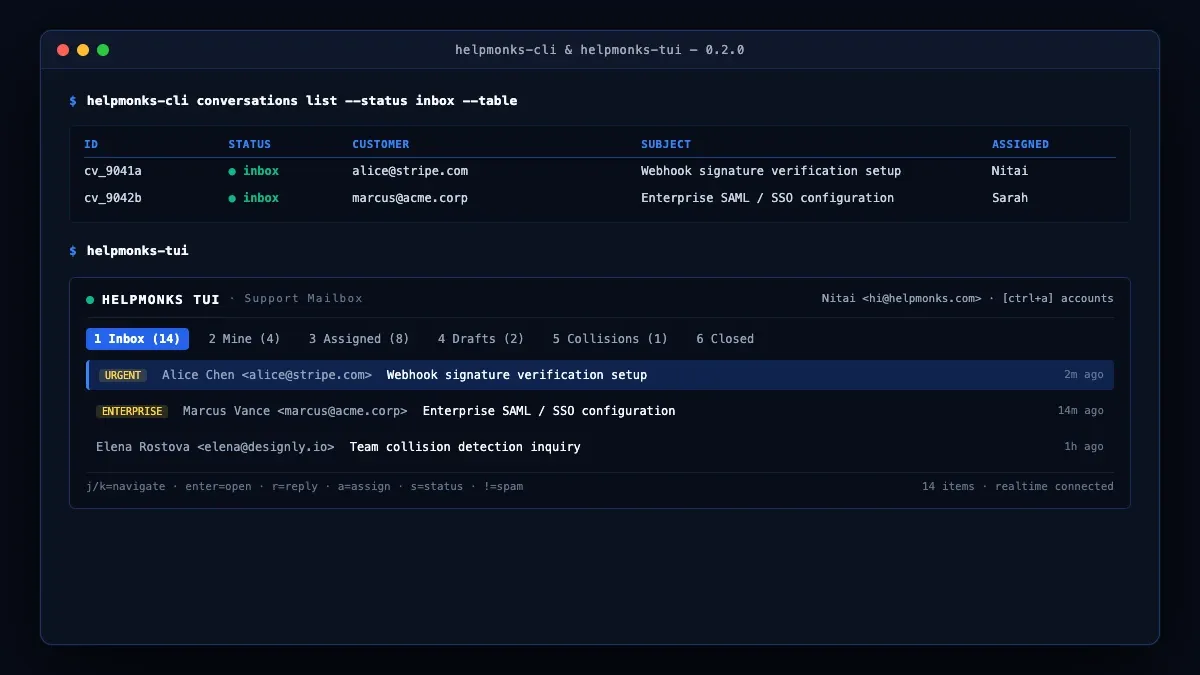
Team communication and customer support rarely begin or end in the browser.
They start in server logs, alert notifications, deployment pipelines, webhook failures, support scripts, and increasingly in conversations with AI coding agents. Stopping work to switch windows, find an email thread in a browser tab, check who is assigned, or paste technical context into an internal note creates operational friction and slows down customer response times.
That is why we are introducing Helpmonks in your terminal: two distinct, powerful tools packaged together in @helpmonks/cli:
- The Helpmonks CLI (
helpmonks-cli) — Scriptable, composable, and agent-ready shared inbox management for your shell scripts, cron jobs, and CI/CD pipelines. - The Helpmonks TUI (
helpmonks-tui) — A full-screen, keyboard-first terminal client for working through your team inbox at lightning speed on macOS and Linux.
Automate the work around your inbox with the Helpmonks CLI
The Helpmonks CLI gives developers, technical leads, and DevOps engineers direct command-line access to your team's shared inboxes.
You can search customer threads, triage incoming conversations, add internal notes, assign tickets, update labels and statuses, manage drafts, and reply to customers directly from your shell.
# List conversations in your inbox
helpmonks-cli conversations list --status inbox --table

# Search customer conversations across mailboxes
helpmonks-cli conversations search 'Stripe webhook signature' --pretty

# Add an internal note to an existing thread
helpmonks-cli notes add CONVERSATION_ID 'Investigated logs: fixed deployed in commit 7c89a.'

# Assign a conversation to a teammate
helpmonks-cli conversations assign CONVERSATION_ID --user-id USER_ID
Built for scripting, CI, and AI agents
The CLI was engineered from day one for seamless developer ergonomics:
- Compact JSON by default: Pipe command outputs cleanly into
jq, shell scripts, cron jobs, or incident management webhooks. - Readable terminal tables: Add
--tableto inspect mailboxes, team members, or conversations interactively. - Shell autocompletion: Native completions for Fish, Bash, and Zsh ensure commands and parameters are always at your fingertips.
- AI coding agent ready: Agents running in terminal environments (Claude Code, Cursor, MCP-connected tools) can query customer context, summarize past threads, or prepare draft replies with human approval.
- Live MCP schema discovery: The CLI connects to your Helpmonks instance and discovers commands dynamically, guaranteeing that permissions, custom mailbox settings, and validation rules match your account.
A complete terminal inbox: The Helpmonks TUI
For engineers and operators who spend their days in tmux, Alacritty, iTerm, or Kitty, switching between the terminal and a browser inbox disrupts focus. helpmonks-tui brings the complete Helpmonks shared inbox experience directly into your terminal.
# Launch the interactive terminal client
helpmonks-tui
The TUI delivers a full-screen, keyboard-driven interface with everything you need for efficient customer communication:
- Unified mailbox navigation: Quickly switch between Inbox, Mine, Assigned, Drafts, Reminders, and Closed queues.
- Team collision detection: Real-time presence indicators show when a teammate is viewing or replying to a thread, preventing duplicate customer responses.
- Keyboard-first triage: Use familiar Vim-style keys (
j/kto navigate,enterto open,rto reply,ato assign,sto change status). - Markdown composition: Draft and format replies in clean Markdown with full preview and attachment handling.
- Multi-account support: Easily toggle between multiple Helpmonks accounts and organizations with
ctrl+a. - Secure authentication: Authenticate securely once via browser OAuth with tokens stored in your operating system's local keyring.
Deliberate safety and security controls
When operating in automated environments and server consoles, safety is paramount:
- Environment variable authentication: CLI commands read API tokens from environment variables (such as
HELPMONKS_API_KEYorHELPMONKS_TOKEN), never exposing sensitive credentials in command arguments or shell history. - Interactive safety confirmations: Destructive actions (like deleting conversations or permanent discards) require explicit interactive confirmation by default, with a
--yesflag for headless CI pipelines. - Full audit trail: Every action taken through the CLI or TUI is attributed to your user account in the Helpmonks audit log.
Get started now
The Helpmonks CLI and TUI are distributed in the unified @helpmonks/cli npm package and require Node.js 24 or newer.
Install it globally using pnpm or npm:
# Using pnpm
pnpm add --global @helpmonks/cli

# Using npm
npm install --global @helpmonks/cli
Launch the interactive TUI:
helpmonks-tuiOr explore the available CLI commands:
helpmonks-cli --helpThe CLI, TUI, and MCP server are included with all paid Helpmonks plans. For more details, explore the @helpmonks/cli on npm and read our MCP & Agent Skills Guide.