
Landing pages
Landing page builder for email signups
Publish a signup page, collect contacts through its form, and use that list for email campaigns or a welcome sequence.
From $49 a month · Unlimited users on every plan

Trusted by 3,000+ customers worldwide
“We are able to have multiple people work through one mailbox.”
“Helpmonks helps us answer customer emails at lightning speed.”
“Love that it is one price for one inbox. Easy for all our staff to review customer contact in one location. Easy to track conversations.”
Signups
From a signup form to the first email
-
Create a landing page for a newsletter or a downloadable guide. Ask for an email address and tell visitors what they are signing up for. Use the contacts who sign up as the audience for your first campaign.


Build
Build the page and connect it to your campaign
-
Choose a page layout
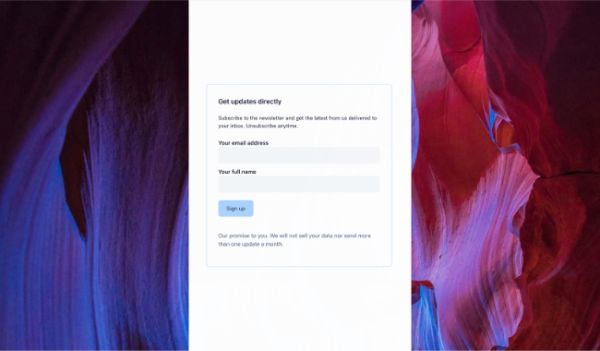
Start with a layout in the editor. Add your heading and form, then choose a background that keeps the signup easy to read.

-
Publish a signup form
Publish a hosted landing page and share its link in an email or on social media. If you already have a page, embed a custom form there.
-
Keep signups together
Create a page for each offer and organize signups in Helpmonks with a mailing list or contact label.
Explore customer relationship management
-
Send a welcome sequence
Use the signup label to start a welcome sequence. For example, send a promised guide first, then follow up a few days later with a related resource.
Explore email sequences


FAQ
Questions about landing pages
Do I need a website to publish a landing page?
No. Helpmonks hosts the landing page and gives you a link you can share. You can also embed a signup form on your website or online store.
Where do form submissions go?
Signups are saved as Helpmonks contacts. Use the form settings to put them on a mailing list or use a label to group them.
Can I send a one-time email to the list?
Yes. Select the subscribers as the recipients of an email campaign. Check your plan’s campaign limit before sending.
In the inbox business. Since 2012.

Hey, I’m Nitai. We built Helpmonks in 2012. We’ve spent the years since building it, supporting the teams who rely on it, and learning what happens when customer email is your business.
That experience goes into everything we ship, including AI. We know the work because we’ve been doing it for years. Still self-funded. Still answering our own support emails. Still here to help you get yours done.
Nitai, founder
Bring your whole team into every customer conversation.
Start with three shared inboxes and unlimited users. Free for 30 days.
